Industrial AI Architecture: Vision, Process and Quality Workflows
Connect industrial data, vision models, process events and quality rules in a bounded architecture, with confirmed modules and equipment interfaces.
Connect evidence, process events and defined decisions
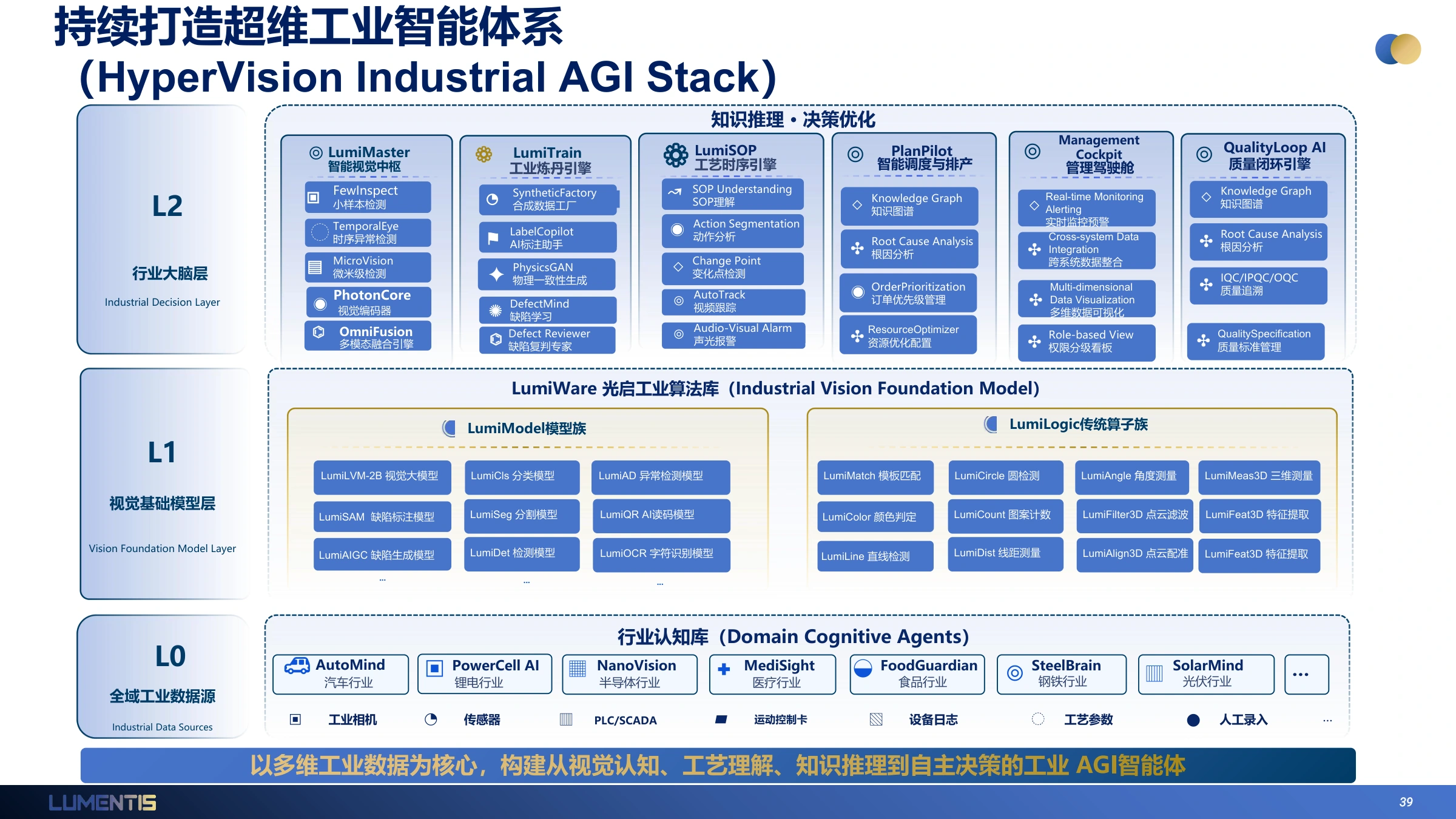
HyperVision describes an evolving industrial AI architecture. It organizes industrial context, visual interpretation and application workflows so that a bounded inspection task can be related to equipment and quality records. The source calls it the HyperVision Industrial AGI Stack; that title does not establish general intelligence or an autonomous factory.
Three architecture layers
| Layer | Documented elements | Engineering requirement |
|---|---|---|
| L0: industrial data and context | Industrial cameras, sensors, PLC/SCADA, motion controllers, equipment logs, process parameters and manual input | Confirm access, identifiers, timestamps, units, data quality and permissions |
| L1: LumiWare model and operator capabilities | LumiModel and LumiLogic families | Select the task, validate outputs and define invalid/uncertain states |
| L2: application and decision workflows | Inspection, training, SOP, planning, dashboards and quality review | Confirm available modules, human responsibility, interface scope and acceptance rules |
LumiModel: nine named model directions
- LumiLVM-2B
- LumiSAM
- LumiAIGC
- LumiCls
- LumiSeg
- LumiDet
- LumiAD
- LumiQR
- LumiOCR
LumiLogic: eleven unique operators
- LumiMatch
- LumiColor
- LumiLine
- LumiCircle
- LumiCount
- LumiDist
- LumiAngle
- LumiFilter3D
- LumiAlign3D
- LumiMeas3D
- LumiFeat3D
LumiFeat3D appears twice in the source diagram and is counted once here. Names alone do not establish supported input types, metrology accuracy or deployment availability.
Six application groups and 27 submodules
| Framework group | Named submodules |
|---|---|
| LumiMaster | FewInspect, TemporalEye, MicroVision, PhotonCore, OmniFusion |
| LumiTrain | SyntheticFactory, LabelCopilot, PhysicsGAN, DefectMind, Defect Reviewer |
| LumiSOP | SOP Understanding, Action Segmentation, Change Point, AutoTrack, Audio-Visual Alarm |
| PlanPilot | Knowledge Graph, Root Cause Analysis, OrderPrioritization, ResourceOptimizer |
| Management Cockpit | Real-time Monitoring Alerting, Cross-system Data Integration, Multi-dimensional Data Visualization, Role-based View |
| QualityLoop AI | Knowledge Graph, Root Cause Analysis, IQC/IPQC/OQC, QualitySpecification |
These are source framework directions; current availability is unconfirmed. MicroVision is a module name, not a guaranteed micrometer accuracy specification. Planning and root-cause analysis require their own data, objectives and evaluation.
Industry directions in the source framework
| Name | Sector |
|---|---|
| AutoMind | Automotive |
| PowerCell AI | Lithium batteries |
| NanoVision | Semiconductors |
| MediSight | Medical manufacturing |
| FoodGuardian | Food manufacturing |
| SteelBrain | Steel |
| SolarMind | Photovoltaics |
A named direction does not establish a complete pretrained industry agent, clinical or food-safety capability, or a delivered EEK customer project.
Start from the manufacturing quality task
| Production question | Technology route | Boundary |
|---|---|---|
| Is the visible surface acceptable? | Lighting, detection/segmentation or anomaly model | Hidden/internal defects need an appropriate additional method |
| Where is the part for robot alignment? | Feature location and a calibrated coordinate transform | Validate reachability, tool frame, uncertainty and fault interlocks |
| Can the identifier be read and linked to this item? | OCR/code reading plus identity and record binding | Decoding is different from standards-based code grading |
| Does a dimension meet the drawing? | Calibrated geometric measurement and a reference method | Sampling scale is not measurement accuracy |
| Are all required components visibly present? | Presence, variant and completeness checks | Appearance does not prove torque, strength or internal function |
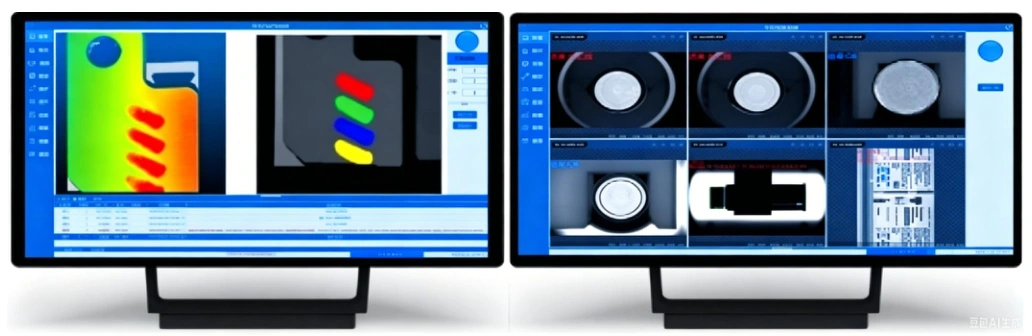
Implement one bounded workflow first
- Define the inspection or process question and the action required from each valid result.
- List the data sources and associate evidence with part, batch, station, recipe and time.
- Trial the imaging, operators and models using representative production samples.
- Agree PLC/robot/quality interfaces and invalid-result handling; test timeouts and reconnection.
- Validate the complete workflow against quality rules, then control versions and review changes.
Training remains an offline support branch. Production results may become reviewed examples for a later model release; the architecture does not imply unrestricted automatic retraining.
View source diagrams and interface examples
Engineering questions
Are all framework modules available as a standard package?
No such availability is established. Confirm the software version, licenses, interfaces, current modules and delivery responsibilities for the specific project.
Does visual recognition make a quality decision by itself?
Operators and models supply evidence. Explicit acceptance rules and process context determine pass, reject, warn or review; invalid or uncertain evidence needs a defined response.
Does the architecture establish EEK ownership of every named module?
No. The names describe supplied technical material. Software provenance, licensing, available modules and EEK integration responsibilities must be confirmed for the project.
Connected technologies
Evaluate your inspection task
Send representative good and defective parts or images, acceptance limits, part dimensions, target cycle time, installation constraints and PLC or robot interface details. Include operation video and the SOP for a process-recognition task. Agree the trial, acceptance method and available modules before selecting a production configuration.